> For the complete documentation index, see [llms.txt](https://help.pagefly.io/llms.txt). Markdown versions of documentation pages are available by appending `.md` to page URLs; this page is available as [Markdown](https://help.pagefly.io/pagefly-help-center-japanese/cart-drawer/components.md).
# コンポーネント
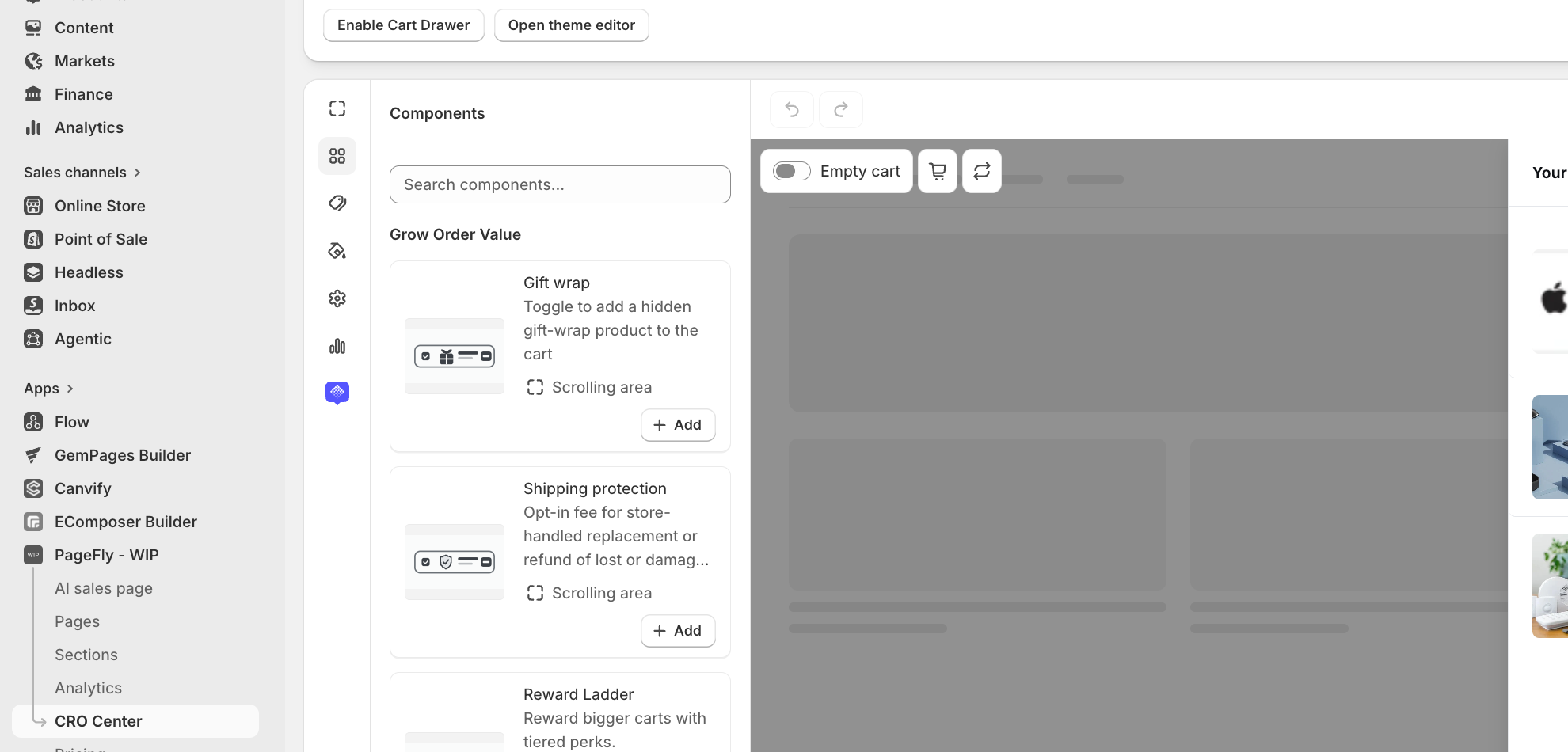
ビルダーのコンポーネントピッカーは6つのグループに分かれています。Foundational(基本)のコンポーネントはすべてのドロワーに常に含まれ、削除できません。それ以外はすべて任意で、**Add** をクリックするか、キャンバスにドラッグして追加します。
ビルダーのレイアウト:カテゴリーレール、コンポーネントピッカー、ライブプレビュー
#### Foundational(常に表示)
| コンポーネント | 役割 |
| --------------- | --------------------------- |
| Drawer Header | ドロワーのタイトルバーと閉じるボタン。 |
| Cart Items | 現在カートに入っている商品の一覧。 |
| Subtotal | チェックアウトの上に表示される小計。 |
| Checkout Button | お客様をShopifyのチェックアウトに移動させます。 |
| Empty Cart | カートが空のときに表示される内容。 |
#### Grow order value(注文額を増やす)
| コンポーネント | 役割 |
| ---------------------------------------------------------------------------------------------------------- | ------------------------------------------ |
| [Reward Ladder](https://help.pagefly.io/pagefly-help-center-japanese/cart-drawer/components/reward-ladder) | 送料無料、無料ギフト、段階的な割引に向けた進捗バーを表示します。 |
| [Bundle Offers](https://help.pagefly.io/pagefly-help-center-japanese/cart-drawer/components/bundle-offers) | 別のBundlesページで定義した、割引付きの商品バンドルを提案します。 |
| Cart Recommendations | カート内の商品に合う、厳選した商品を表示します。 |
| Gift Wrap | お客様が注文にギフトラッピング商品を追加できるようにします。 |
| Shipping Protection | 配送中の紛失や破損に対して、ストアが交換または返金で対応するための任意加入の手数料。 |
#### Build trust(信頼を高める)
| コンポーネント | 役割 |
| ------------- | -------------------- |
| Trust Signals | 決済、セキュリティ、返品に関するバッジ。 |
#### Add urgency(緊急性を高める)
| コンポーネント | 役割 |
| --------------- | ----------------- |
| Countdown Timer | オファー終了までのカウントダウン。 |
#### Remove buying barriers(購入の障壁を取り除く)
| コンポーネント | 役割 |
| ------------- | ---------------------- |
| Discount Code | 割引コードの入力欄。 |
| Order Note | お客様が注文にメモを追加できるようにします。 |
| Welcome Back | リピーターのお客様に表示されるメッセージ。 |
#### Promote(告知する)
| コンポーネント | 役割 |
| ------------ | ----------------------- |
| Announcement | ドロワー内のプロモーションメッセージやバナー。 |
#### コンテンツブロック
上記のコンポーネントのほかに、シンプルなレイアウト用ブロック(**Image**、**Rich text**、**Divider**、**Spacer**、**Badge**)をドロワー内の好きな場所にドラッグできます。
{% hint style="warning" %}
**Reward LadderとBundle Offersは、チェックアウト時に実際の割引を適用します。** いずれかを初めて追加すると、ビルダーがPageFlyへの追加のShopify権限(`read/write_cart_transforms`、`read/write_discounts`)の付与を案内します。権限を付与するまで、コンポーネントはビルダー内でプレビューされますが、実際のお客様に割引が適用されることはありません。詳しくは[Reward Ladder](https://help.pagefly.io/pagefly-help-center-japanese/cart-drawer/components/reward-ladder)と[Bundle Offers](https://help.pagefly.io/pagefly-help-center-japanese/cart-drawer/components/bundle-offers)をご覧ください。
{% endhint %}
---
# Agent Instructions
This documentation is published with GitBook. GitBook is the documentation platform designed so that both humans and AI agents can read, navigate, and reason over technical content effectively. Learn more at gitbook.com.
## Querying This Documentation
If you need additional information that is not directly available in this page, you can query the documentation by asking a question.
Perform an HTTP GET request on the following URL with the `ask` and `goal` query parameters:
```
GET https://help.pagefly.io/pagefly-help-center-japanese/cart-drawer/components.md?ask=&goal=
```
`ask` is the immediate question: it should be specific, self-contained, and written in natural language.
`goal` is what the user is ultimately trying to achieve, the reason they need the answer. Sharing it helps GitBook give you a better, more relevant answer. A goal is most helpful when it describes the outcome the user wants rather than restating the question. For example, with `ask=how do I create an API token`, a goal like `automate deployments from our CI pipeline` lets GitBook tailor the answer to that use case.
The response will contain a direct answer to the question and relevant excerpts and sources from the documentation.
Use this mechanism when the answer is not explicitly present in the current page, you need clarification or additional context, or you want to retrieve related documentation sections.